





Specifications of Drive
| Motor | EzM2-20 series |
EzM2-28 series |
EzM2-35 series |
EzM2-42 series |
EzM2-56 series |
EzM2-60 series |
|||||||||||||||||||||||||||||||||||||||||||||||||||||||
|---|---|---|---|---|---|---|---|---|---|---|---|---|---|---|---|---|---|---|---|---|---|---|---|---|---|---|---|---|---|---|---|---|---|---|---|---|---|---|---|---|---|---|---|---|---|---|---|---|---|---|---|---|---|---|---|---|---|---|---|---|---|
| Drive | EzS2-EC-TO-20 series |
EzS2-EC-TO-28 series |
EzS2-EC-TO-35 series |
EzS2-EC-TO-42 series |
EzS2-EC-TO-56 series |
EzS2-EC-TO-60 series |
|||||||||||||||||||||||||||||||||||||||||||||||||||||||
| Input Voltage | DC24V±10% | ||||||||||||||||||||||||||||||||||||||||||||||||||||||||||||
| Control Method | Closed loop control with 32bit MCU | ||||||||||||||||||||||||||||||||||||||||||||||||||||||||||||
| Current Consumption | Max. 500mA (Except motor current) | ||||||||||||||||||||||||||||||||||||||||||||||||||||||||||||
| Operating Condition |
Ambient Temperature | · In Use: 0~50˚C · In Storage: -20~70˚C |
|||||||||||||||||||||||||||||||||||||||||||||||||||||||||||
| Humidity | · In Use: 35~85% RH (Non-Condensing) · In Storage: 10~90% RH (Non-Condensing) |
||||||||||||||||||||||||||||||||||||||||||||||||||||||||||||
| Vib. Resist. | 0.5g | ||||||||||||||||||||||||||||||||||||||||||||||||||||||||||||
| Function | Rotation Speed | 0~3,000r/min*1 | |||||||||||||||||||||||||||||||||||||||||||||||||||||||||||
| Resolution |
|
||||||||||||||||||||||||||||||||||||||||||||||||||||||||||||
| Error Type | Over Current Error, Over Speed Error, Position Tracking Error, Over Load Error, Over Temperature Error, Over Regenerated Voltage Error, Motor Connect Error, Encoder Connect Error, Main Power Voltage Error, In-Position Error, ROM Error, Position Overflow Error, Abnormal Safety State Error | ||||||||||||||||||||||||||||||||||||||||||||||||||||||||||||
| LED Display | Power status, In-Position status, Servo On status, Alarm status | ||||||||||||||||||||||||||||||||||||||||||||||||||||||||||||
| EtherCAT | Supported Protocol | CoE (CiA 402 Drive Profile), FoE (Firmware Download) | |||||||||||||||||||||||||||||||||||||||||||||||||||||||||||
| Operation Mode | Cyclic Synchronous Position Mode, Profile Position Mode, Homing Mode | ||||||||||||||||||||||||||||||||||||||||||||||||||||||||||||
| Synchronization | Free Run, SM Event, DC SYNC Event | ||||||||||||||||||||||||||||||||||||||||||||||||||||||||||||
| I/O Signal |
Input Signals | 3 dedicated inputs (LIMIT+, LIMIT-, ORIGIN), 6 user inputs (photocoupler inputs), 2 Torque Off signal inputs (TQOFF) | |||||||||||||||||||||||||||||||||||||||||||||||||||||||||||
| Output Signals | 5 user outputs (photocoupler outputs), 1 Brake signal output, 1 Torque Off status output (TQMON) | ||||||||||||||||||||||||||||||||||||||||||||||||||||||||||||
- * 1 : Up to the resolution of 10,000P/R, maximum speed can be reached by 3,000r/min and with the resolution more than 10,000P/R, maximum speed shall be reduced accordingly.
- * 2 : When selected resolution is more than encoder resolution, motor shall be operated by microstep between pulses.
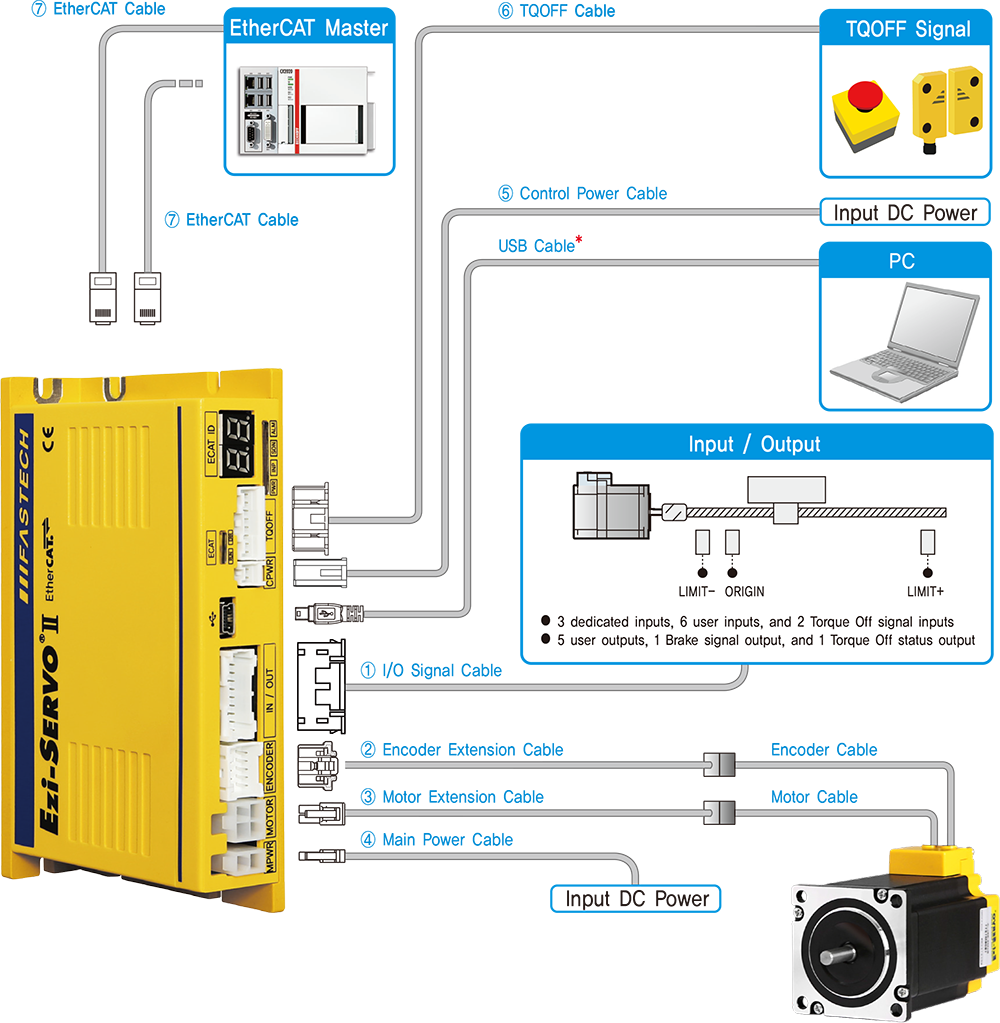
System Configuration
Ezi-SERVOII EtherCAT TO
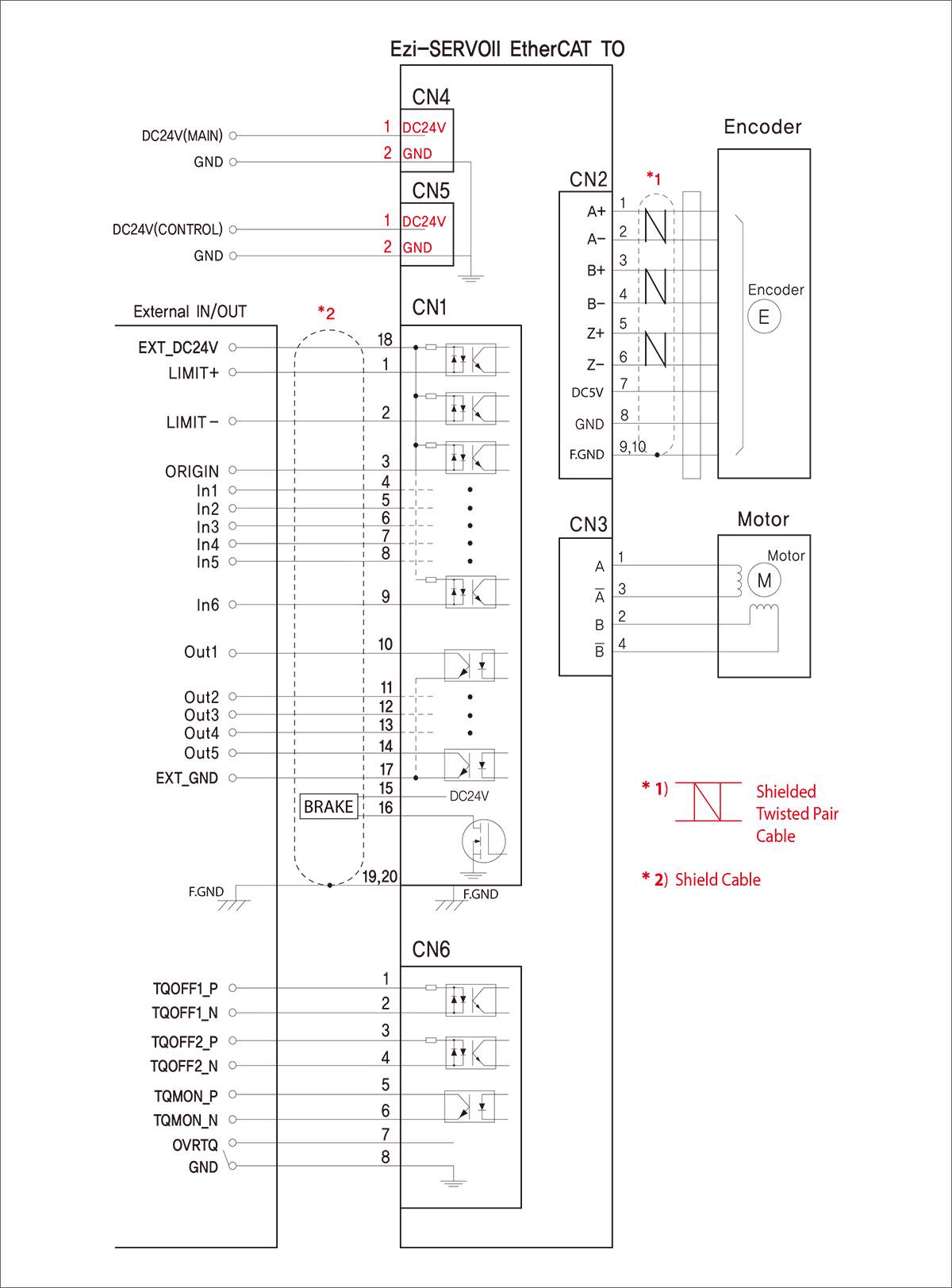
External Wiring Diagram
Ezi-SERVOII EtherCAT TO
[CAUTION] In order to use the products safely and correctly, make sure to read the User Manual before using the products.
※ When connects I/O cable between controller and drive, turn off the power of both controller and drive in order to protect the drive from any damage.